You're Using Claude Code Wrong: Here's What Developers Who Actually Ship Do Differently
Most developers treat it like autocomplete. The best ones treat it like a system. Here's the full playbook.

You’re Using Claude Code Wrong: Here’s What Developers Who Actually Ship Do Differently
Most developers treat it like autocomplete. The best ones treat it like a system. Here’s the full playbook.
I watched a senior engineer ship a full OAuth implementation last week. Passport.js, database schema, refresh token rotation, error boundaries. Forty-seven minutes, production-ready.
The developer next to him had been stuck on the same feature for two days.
Same tool. Same subscription. Completely different outcomes.
The gap wasn’t talent. It wasn’t experience. It was how they thought about what Claude Code actually is.
One of them was prompting. The other was orchestrating.
This piece is the full playbook. Not five tips. Everything that actually moves the needle.
The Wrong Mental Model Is Costing You More Than You Think
Most developers interact with Claude Code transactionally.
Write some code, hit a wall, ask Claude to fix it, get the answer, move on. Repeat. It works, but it’s the GPS-for-the-next-turn problem: technically useful, never transformative.
Claude Code isn’t a tool that responds to prompts. It’s an AI coding agent that understands project context, executes structured workflows, and maintains memory across sessions. The moment you start treating it that way, everything changes.
Here’s what that looks like in practice.
1. CLAUDE.md: Stop Reintroducing Yourself Every Session
If you don’t have a CLAUDE.md file at your project root, you’re starting from zero every single time.
New session, new terminal, new context. Claude walks in the door not knowing your stack, your conventions, your current sprint goal, or the architectural decisions you made three weeks ago that still matter today. You end up typing the same background every single prompt. It adds up.
CLAUDE.md is your project’s permanent onboarding document. Think of it as a briefing note for a new team member who joins your project every morning.
# CLAUDE.md

Project: SaaS billing dashboard

Stack:
- Next.js 14 (App Router)
- Node.js
- PostgreSQL with Prisma

Rules:
- Clean architecture, no shortcuts
- Async/await only, no callbacks
- All API routes need request logging
- Components over 200 lines get extracted
- Write tests for all utility functions

Current Focus:
- OAuth login flow (in progress)
- Webhook handling (next up)
- Billing module (next sprint)
A few things most people get wrong here:
The “Current Focus” section is the most important one. It tells Claude where you are in the project, not just what the project is. Update it at the start of every sprint and Claude starts operating with genuine momentum awareness.
Negative constraints matter as much as positive ones. “Don’t use class components,” “never add a library without asking,” “no inline styles” are as useful as any architectural description. They prevent the subtle drift that makes AI-generated code hard to review.
Go deeper than one file. You can have a root-level CLAUDE.md for project-wide rules and more specific ones inside /frontend or /backend subdirectories. Focused context produces more focused output.
This is the foundation everything else builds on. Without it, all the other tips in this piece are operating at a fraction of their potential.
2. Plan Mode: Make Claude Think Before It Types
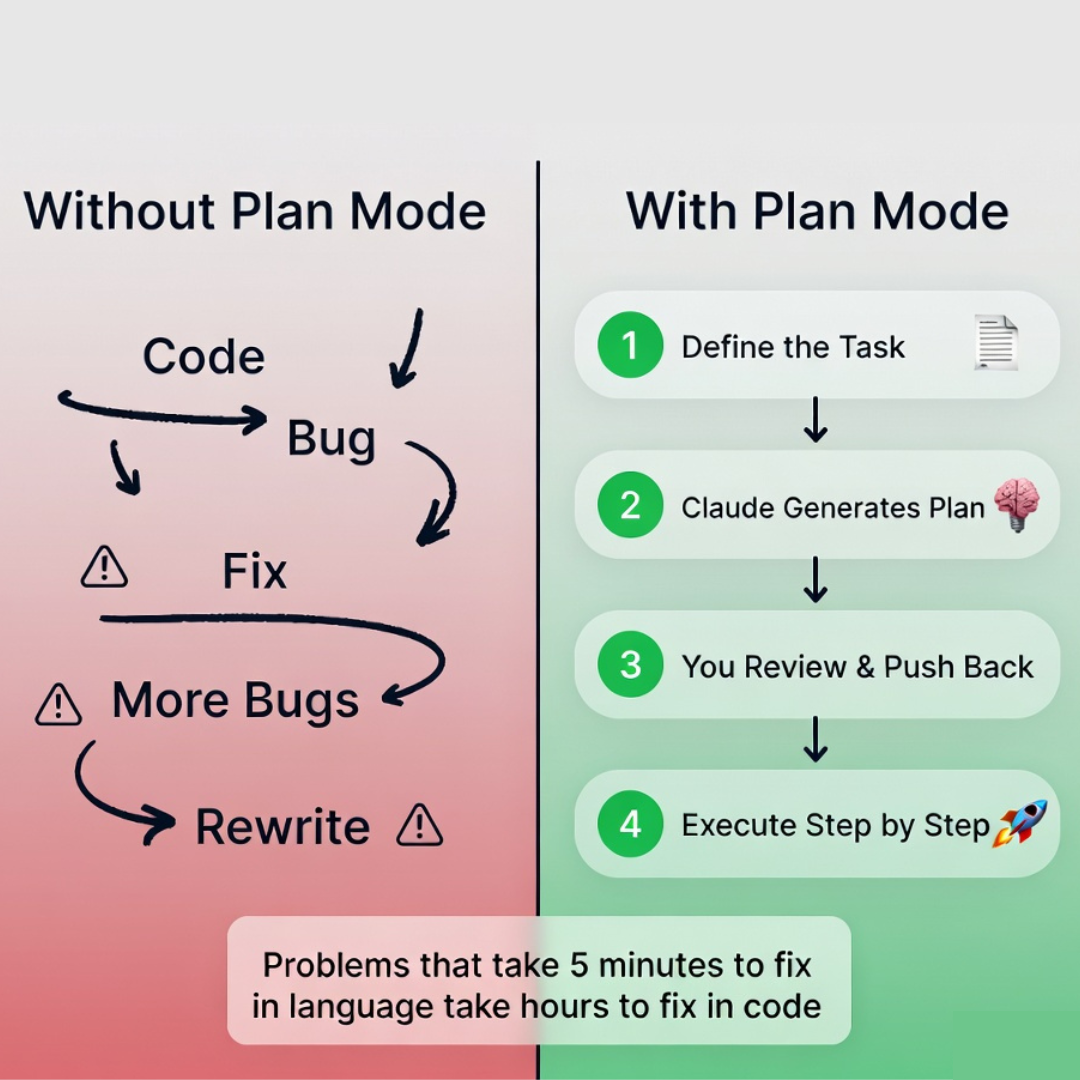
Here’s a pattern most developers repeat: give Claude a task, get back code, notice something’s off, ask for a fix, iterate three more times, end up with something that works but isn’t quite right.
The problem isn’t Claude’s ability. It’s that implementation started before the approach was settled. And when the approach is wrong, you don’t find out until you’re three steps deep and the architecture is load-bearing.
The fix is forcing a plan before any code gets written.
Instead of:
“Implement Google OAuth”
Try:
“Before we write anything, create a step-by-step implementation plan for Google OAuth using Passport.js. Walk me through the data flow, what the database schema needs to look like, the failure modes we should handle, and what needs to exist before we write the first line of code.”
Then read the plan. Engage with it. Push back where the assumptions don’t match your context: “You’re planning to store sessions in Redis, but we don’t have Redis in this stack. How does this change the approach?” This back-and-forth costs five minutes and saves an afternoon.
One useful phrase worth knowing: adding “think hard” or “think carefully about this” to your planning prompt gives Claude more reasoning time before it responds. Small thing, noticeable difference on complex architectural questions.
Once you’re aligned on the approach, execute step by step with explicit checkpoints. “Implement step 1,” then review, then “Implement step 2.” The granularity is what keeps you in control.
Good developers write code. Great developers design systems first.
3. Write Prompts Like a Senior Engineer Giving a Brief
Vague prompt, vague output. Every time.
The quality of what you get back is almost entirely determined by the quality of what you put in. Across dozens of prompts per day, that delta compounds massively.
The structure that consistently produces the best results:
Bad:
“Add authentication”
Better:
Task: Implement Google OAuth login

Context:
Users are signing up via email today. We need to add Google as an option.
This connects to our existing users table in PostgreSQL.

Requirements:
- Use Passport.js
- Handle token expiration and refresh rotation
- Store only what we need (no storing raw tokens)
- Return clear, user-facing error messages for auth failures

Constraints:
- Don't touch the existing email auth logic
- Follow the same middleware pattern as our current auth routes

Output needed:
- Route definitions
- Passport config and strategy
- Database schema updates
- Error handling middleware
The constraints section is where expertise lives. When you define what can’t change and what must be true, Claude stops guessing and starts executing.
One more thing: ask Claude to ask you questions. Before any complex implementation, add “if anything about this brief is unclear, ask me before you start.” You’ll catch misalignments before they become bugs.
4. Parallel Agents: Run Multiple Workstreams at Once
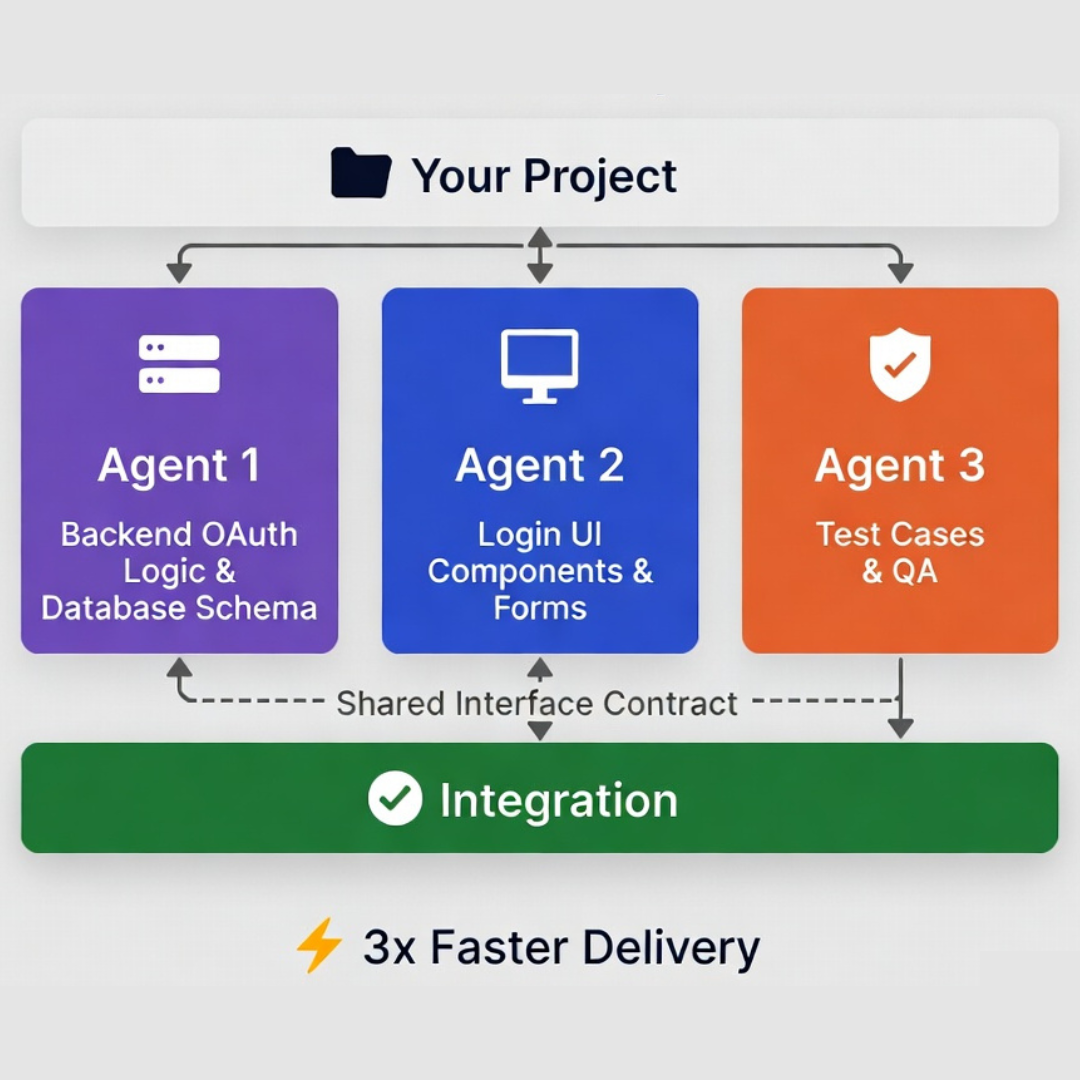
Most developers work with a single Claude instance, sequentially. Task in, output out, next task.
But there’s no reason your backend work and your frontend work and your test suite have to happen one after the other. Claude Code instances can run in parallel, and that changes the ceiling on what you can ship in a day.
Open three terminals. Give each a lane:
- Agent 1: Backend OAuth logic, database schema, route definitions
- Agent 2: Login UI components, form handling, loading states
- Agent 3: Test cases for both, working against the same interface contract
They run simultaneously. They don’t block each other. When they’re done, integration is straightforward because you defined the boundaries upfront.
The coordination overhead is real: you need to be explicit about contracts and interfaces between lanes before anyone starts. But that constraint is actually a feature. It forces you to define interfaces early, which is good architecture practice regardless of whether AI is involved.
This is how you go from “one developer going faster” to “one developer running multiple workstreams without losing coherence.”
5. Hooks and Automation: Stop Repeating Yourself
Every time you type “add error handling” or “make sure there’s logging” or “follow REST conventions,” you’re paying a tax you don’t need to pay.
Claude Code’s hooks let you define triggers that fire automatically. The concept: encode what “done” looks like for your common task types once, then stop explaining it every session.
For API endpoints, “done” in most production codebases means input validation, proper status codes, request logging, and documentation comments. Write that as a hook definition:
Whenever I create a new API endpoint:
- Add input validation with clear error messages
- Add error handling with appropriate HTTP status codes
- Add request/response logging
- Follow our existing REST naming conventions
- Include a brief doc comment explaining what the route does
For React components:
Whenever I create a new component:
- Use TypeScript with proper prop types
- Add a brief JSDoc comment at the top
- Extract any logic over 20 lines into a custom hook
- No inline styles — use our existing CSS modules pattern
Standards that live in your head get forgotten. Standards that are automatically applied become culture. This is how you stop reviewing Claude output for the same five things every single time.
6. Self-Verification: Make Claude Check Its Own Work
Claude Code is fast. Genuinely fast. But fast isn’t the same as right, and the subtle bugs are the dangerous ones: a race condition in a state transition, a hard-coded string that should have been a constant, tests that assert true instead of asserting the right value.
Build verification into the workflow, not as an afterthought.
After any significant output, use this prompt: “Double-check everything you just produced. Verify every assumption, every claim, every implementation detail. At the end, give me a table of what you were able to verify and what you’re less certain about.”
It catches things. Not everything, but enough to be worth the thirty seconds it takes.
Other habits that help: have Claude write tests before or during implementation, not just after. Have it generate a draft PR description and read it before you submit. If something in the output looks off, just ask: “Are you sure about this? Walk me through your reasoning.” The willingness to push back is part of using the tool well.
7. Go Deeper: The Community Has Already Solved Your Problems
There’s a GitHub repository called awesome-claude-code sitting at 26,000+ stars that most developers have never opened. It’s a curated collection of slash commands, hooks, agent skills, and orchestration tools built by the community — and the quality bar is genuinely high.
A few highlights worth knowing: pre-built slash commands for /commit, /tdd, and full PR workflows that drop straight into your .claude/commands folder. Domain-specific agent skills from contributors like Trail of Bits (security auditing) and the DevOps community (infrastructure-as-code). Hooks that enforce TDD discipline in real time, run TypeScript quality checks under 5ms, and scan for prompt injection attacks.
830 commits, actively maintained, and the maintainer is selective. Whatever workflow problem you’re hitting, someone in here has probably already solved it.
8. Use skills.sh: The npm Registry for Claude Code
Think of skills.sh as npm, but for AI agent capabilities.
Launched by Vercel, it’s a public registry where companies and developers publish installable skills for Claude Code. Vercel shipped their own React best-practices skill on launch day and hit 20,000 installs in six hours. Stripe published their integration skill within hours of the announcement. Remotion built a video creation skill that lets Claude generate production-ready Remotion projects from a single prompt.
The install workflow is exactly as clean as npm:
npx skills add https://github.com/vercel-labs/agent-skills --skill vercel-react-best-practicesClaude now has deep, opinionated knowledge of that domain baked in — no prompt engineering required on your end.
Skills live in .claude/skills/ and each one is a SKILL.md file with instructions, templates, and example outputs. They activate automatically when Claude detects the right context, or you can invoke them directly with a slash command. Unlike slash commands (which were a single markdown file), skills can include supporting scripts, reference docs, and example outputs that Claude pulls in as needed.
The practical upside: instead of spending an afternoon writing a CLAUDE.md for your stack, check if someone has already published a skill for it. Someone probably has.
What This Looks Like End-to-End
Here’s the full workflow for shipping OAuth using everything above:
CLAUDE.mdalready has your stack, conventions, current focus, and what “done” means for auth routes- Your IDE integration is connected so Claude can read diagnostics in real time
- You ask for a plan before any code: “Walk me through the OAuth implementation before we write anything”
- You review the plan, push back on the Redis assumption, align on the approach
- You execute step by step: “Implement step 1,” review, “Implement step 2”
- While Agent 1 builds the auth logic, Agent 2 starts the login UI against the agreed interface
- Agent 3 writes tests in parallel, working from the same spec
- You ask Claude to self-verify: “Double-check the token refresh logic, walk me through what happens on expiry”
- Claude generates a draft PR description. You read it before submitting.
You didn’t just use Claude Code. You orchestrated a development system.
The Mistakes Worth Naming

Most developers stay average with this tool for fixable reasons:
Treating it like a search engine. Writing prompts so vague that Claude has to invent the constraints. Skipping CLAUDE.md because it feels like overhead. Jumping straight to coding without a plan. Running one agent when three could run in parallel. Never asking Claude to verify its own work. Letting context degrade across a long session without resetting. Ignoring everything the community has already figured out and open-sourced.
None of these are hard to fix. All of them compound.
The Mental Shift That Changes Everything
We’re at an early, clumsy, genuinely important moment in how software gets built.
The developers who will define what senior engineering looks like in five years aren’t the ones writing the most code. They’re the ones who’ve understood something important early: AI doesn’t replace developers. It exposes bad workflows.
If your prompts are vague, it’s because your thinking is vague. Claude Code makes that more visible, not less. But when your thinking is clear, the leverage is real.
The best engineers are already treating Claude Code as infrastructure. The rest are still prompting.
Remember:
- Context > prompts
- Planning > guessing
- Systems > effort
“The future developer isn’t the one who writes more code. It’s the one who needs to write less.”
Start using Claude Code the right way. And your productivity won’t just improve.
It will multiply.
Share this insight
Join the conversation and spark new ideas.